This Friday will be the first Tech Friday at Prairie Lakes AEA. It's an opportunity for staffers to receive training on various types of technology available to them. I will be talking about basic video shooting and editing using Windows Movie Maker. While it is not my favorite editing package, it is available on all staff laptops here at the agency. It's here, it's free...so let's use it.
I'm embedding the PowerPoint I will be using so it will be available to attendees and anyone else who may get some mileage out of it. I'm sure you'll find better tutorials out there, but this is the one I'll use to begin our conversations about media production.
Wednesday, September 19, 2012

Wednesday, August 22, 2012
NEW FCC Rules on Closed Captioning for Web TV Content
An article seen on gigaom.com advises us that "Web TV needs to have captions starting next month, FCC rules". This was established with the "Twenty-First Century Communications and Video Accessibility Act of 2010" and reaffirmed by an FCC ruling just a few days ago.
 Does this apply to you? Are you legally required to CC all content you upload to your YouTube or Eduvision website?
First off, a caveat: I'm not a lawyer and I don't play one on TV. For legal advice, always consult your attorney. All right, moving on. From my reading, it appears that this applies to programming that has been shown on television and does not apply to "web-only" content. If you are producing content in your home studio or school media center, this law does not legally require you to add Closed Captioned content to your video projects that you upload and show online. That's my take on it, anyway.
However, this does not answer if you should provide CC or subtitles on your video projects. Does it serve your audience to have this content available to the hearing impaired? Is it a good idea even if it's not legally required? That is something you need to consider with your current and future video projects.
 Does this apply to you? Are you legally required to CC all content you upload to your YouTube or Eduvision website?
First off, a caveat: I'm not a lawyer and I don't play one on TV. For legal advice, always consult your attorney. All right, moving on. From my reading, it appears that this applies to programming that has been shown on television and does not apply to "web-only" content. If you are producing content in your home studio or school media center, this law does not legally require you to add Closed Captioned content to your video projects that you upload and show online. That's my take on it, anyway.
However, this does not answer if you should provide CC or subtitles on your video projects. Does it serve your audience to have this content available to the hearing impaired? Is it a good idea even if it's not legally required? That is something you need to consider with your current and future video projects.
Sunday, June 17, 2012
School announcements on video...No Money? No Problem!
Wednesday, March 21, 2012
I only have one rule: DON'T do this to your data projector!
My supervisor brought her Proxima data projector to me today. The picture is very dim, she said, and could I take a look at it? So I took her projector to the test bench to see if I could discover the problem.
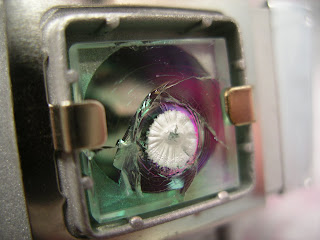
MELTED & SHATTERED GLASS
The first thing I did was open the little access panel on the projector and remove the bulb. What the heck was wrong with it? As you can see in the photo, the heat-absorbing glass in front of the bulb was melted and fractured. So then I looked at the lens cap and saw that it had begun to melt. So riddle me this....what would cause the glass panel on the front of the bulb as well as the lens cap to melt?
Right. Someone had powered up the projector and then placed the lens cap over the lens. All of that high intensity light was shooting out of the bulb, hitting the lens cap and reflecting back into the bulb housing. That creates a tremendous amount of heat; enough to melt a quarter inch thick piece of glass that is specially designed to absorb heat.
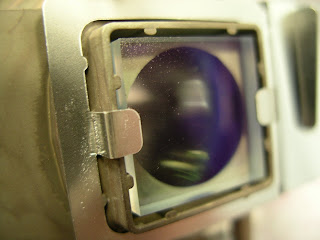
NORMAL GLASS
Normally, this would mean buying a $120 lamp to replace the one with the melted glass. However, I was fortunate enough to have a burned out lamp of exactly the same make and model. Removing the melted glass from one and replacing it with the intact glass from another allowed me to make the repair for nothing. Just dumb luck that I had not thrown away the bad bulb a week earlier.
As Barney Stinson says on TV, "I only have one rule." And my rule is this: NEVER, NEVER put the lens cap on a data projector while the bulb is lit. You will ruin your expensive bulb and also perhaps your expensive projector.

MELTED & SHATTERED GLASS
The first thing I did was open the little access panel on the projector and remove the bulb. What the heck was wrong with it? As you can see in the photo, the heat-absorbing glass in front of the bulb was melted and fractured. So then I looked at the lens cap and saw that it had begun to melt. So riddle me this....what would cause the glass panel on the front of the bulb as well as the lens cap to melt?
Right. Someone had powered up the projector and then placed the lens cap over the lens. All of that high intensity light was shooting out of the bulb, hitting the lens cap and reflecting back into the bulb housing. That creates a tremendous amount of heat; enough to melt a quarter inch thick piece of glass that is specially designed to absorb heat.

NORMAL GLASS
Normally, this would mean buying a $120 lamp to replace the one with the melted glass. However, I was fortunate enough to have a burned out lamp of exactly the same make and model. Removing the melted glass from one and replacing it with the intact glass from another allowed me to make the repair for nothing. Just dumb luck that I had not thrown away the bad bulb a week earlier.
As Barney Stinson says on TV, "I only have one rule." And my rule is this: NEVER, NEVER put the lens cap on a data projector while the bulb is lit. You will ruin your expensive bulb and also perhaps your expensive projector.
Friday, March 02, 2012
Tuesday, January 03, 2012
Storm Lake links

On January 4th, I'll be working with educators from the Storm Lake Community School District. We'll talk about simple ways to move video footage from a Flip Camera to a DVD, and I'm sure a hundred other questions and ideas will pop up during the day. I will also recommend some web sites and free software to use in their media production endeavors. Here are the links we talked about:
Any Video Converter is available here.
A tutorial on Windows Movie Maker, produced by Kent State University, is here.
DVD Flick, free DVD burning software, is available here.
Iowa AEA Online, a resource for Iowa educators, is here.
Videomaker Magazine has some wonderful free resources for video producers here.
Here is hoping we all have a great day at Storm Lake!

Tuesday, February 16, 2010
What's The Frequency, Kenneth?
The headline from the FCC says it all:
"OPERATION OF WIRELESS MICROPHONES IN THE 700 MHZ BAND IS PROHIBITED AFTER JUNE 12, 2010"
As part of the DTV switchover and re-allocation of frequencies, the frequencies between 698 and 806 Mhz (the 700 Mhz band) will no longer be allocated to television stations and will instead be used by broadband providers and public service entities. This change is effective June 12, 2010.
Here is the official statement from the Federal Communications Commission.
What does that mean to you, the Media Producer or Audio/Visual Person?
Wooo-boy!
It means that it will be illegal to use any wireless microphones on those frequencies after 6/12/10. Failure to comply with this FCC requirement may lead to civil and/or criminal penalties.
What do you do if you own wireless mics in that band? The FCC suggests you contact the manufacturer to see if the unit can be re-tuned to another frequency. The Feds have provided a website that lists the problematic equipment by manufacturer and model, and also tells if that unit can be modified or not.
And if said unit can't be re-tuned or modified; I guess it goes to the landfill.
While we don't care for this decision, we need to obey it. If our wireless signal interferes with a transmission from an ambulance or firefighter, then we've endangered the public and opened ourselves up to a whole lot of legal problems as well.
Wait until I tell my boss about this.
"OPERATION OF WIRELESS MICROPHONES IN THE 700 MHZ BAND IS PROHIBITED AFTER JUNE 12, 2010"
As part of the DTV switchover and re-allocation of frequencies, the frequencies between 698 and 806 Mhz (the 700 Mhz band) will no longer be allocated to television stations and will instead be used by broadband providers and public service entities. This change is effective June 12, 2010.
Here is the official statement from the Federal Communications Commission.
What does that mean to you, the Media Producer or Audio/Visual Person?
Wooo-boy!
It means that it will be illegal to use any wireless microphones on those frequencies after 6/12/10. Failure to comply with this FCC requirement may lead to civil and/or criminal penalties.
What do you do if you own wireless mics in that band? The FCC suggests you contact the manufacturer to see if the unit can be re-tuned to another frequency. The Feds have provided a website that lists the problematic equipment by manufacturer and model, and also tells if that unit can be modified or not.
And if said unit can't be re-tuned or modified; I guess it goes to the landfill.
While we don't care for this decision, we need to obey it. If our wireless signal interferes with a transmission from an ambulance or firefighter, then we've endangered the public and opened ourselves up to a whole lot of legal problems as well.
Wait until I tell my boss about this.
Tuesday, January 12, 2010
Distorted USB microphone with Garageband?
One of the teachers who I work with just gave me a phone call because he had a problem. I had loaned him a USB microphone so his students could record a radio newscast on Garageband. The students tried the mic and discovered that their audio was distorted, or "fuzzy" as they put it. How do you fix that?
I sent them the following steps.
1. Boot up your Mac and double click on Garageband to open it.
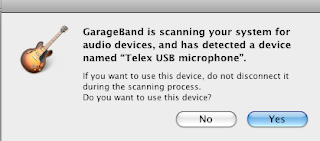
2. Plug in your USB mic. You should get this pop-up window:
3. Select YES
Do a test recording in Garageband to make sure the mic is working. Probably, your test recording will be distorted and look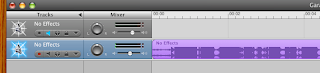 like this:
Note that the blue waveform has the top and bottom clipped off. This is called “clipping” and is caused by the signal being too loud. When you play back this audio recording, it will sound distorted and fuzzy.
Here is how to fix that.
4. Go to SYSTEM PROPERTIES and select SOUND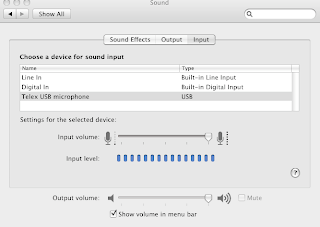
5. Choose INPUT from the tabs on in the window.
6. Select TELEX USB MICROPHONE (in this example.)
7. Speak into the mic and note the INPUT LEVEL. If the blue dots goe all the way to the right (as shown) then your audio signal is too loud and will be distorted.
8. Slide the INPUT VOLUME slider to the left as you continue speaking. Set the slider at a position where the blue dots never go all the way to the right.
9. Go back to Garageband and do another test recording.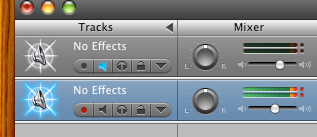
10. Look at the two bars that indicate your input level when you are recording. If they look like this, then you are too loud and your audio will be distorted.
11. If they look like this, then your audio levels
should be all right.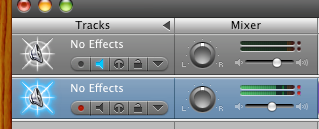
I sent them the following steps.
1. Boot up your Mac and double click on Garageband to open it.

2. Plug in your USB mic. You should get this pop-up window:
3. Select YES
Do a test recording in Garageband to make sure the mic is working. Probably, your test recording will be distorted and look
 like this:
Note that the blue waveform has the top and bottom clipped off. This is called “clipping” and is caused by the signal being too loud. When you play back this audio recording, it will sound distorted and fuzzy.
Here is how to fix that.
4. Go to SYSTEM PROPERTIES and select SOUND

5. Choose INPUT from the tabs on in the window.
6. Select TELEX USB MICROPHONE (in this example.)
7. Speak into the mic and note the INPUT LEVEL. If the blue dots goe all the way to the right (as shown) then your audio signal is too loud and will be distorted.
8. Slide the INPUT VOLUME slider to the left as you continue speaking. Set the slider at a position where the blue dots never go all the way to the right.
9. Go back to Garageband and do another test recording.

10. Look at the two bars that indicate your input level when you are recording. If they look like this, then you are too loud and your audio will be distorted.
11. If they look like this, then your audio levels
should be all right.

Monday, August 25, 2008
Cables, Connectors & Adapters
When training someone to work as a media or audiovisual assistant, they need to learn some basics right away.
At Prairie Lakes AEA, my department provides media support for our many meetings and presentations, so we need to know how to connect various audio and video media devices. Data projectors, PA systems, DVD players and so on. Learning the various cables, connectors and adapters might be a good place to start with a new person.
A connector can be either a plug (male) or a jack (female). For example, you might need a cable that's an RCA plug to an RCA jack.
Here are what they all look like:

RCA plug

RCA jack

XLR (or Canon) plug

XLR (or Canon) jack

BNC plug

BNC jack

Phono (quarter inch) plug

Phono (quarter inch) jack

Mini (eighth inch) plug

Mini (eighth inch) jack

VGA to VGA
At Prairie Lakes AEA, my department provides media support for our many meetings and presentations, so we need to know how to connect various audio and video media devices. Data projectors, PA systems, DVD players and so on. Learning the various cables, connectors and adapters might be a good place to start with a new person.
A connector can be either a plug (male) or a jack (female). For example, you might need a cable that's an RCA plug to an RCA jack.
Here are what they all look like:

RCA plug

RCA jack

XLR (or Canon) plug

XLR (or Canon) jack

BNC plug

BNC jack

Phono (quarter inch) plug

Phono (quarter inch) jack

Mini (eighth inch) plug

Mini (eighth inch) jack

VGA to VGA
Thursday, August 21, 2008
I Trust You'll Treat Her Well
Van Harden of WHO Radio read this on the air this morning, in honor of the first day of school. It is written by Dan Valentine and is something for teachers and parents to remember.
I Trust You'll Treat Her Well
By Dan Valentine --
Dear World: I bequeath to you today one little girl…in a crispy dress…with two blue eyes…and a happy laugh that ripples all day long…and a flash of light blond hair that bounces in the sunlight when she runs. I trust you will treat her well.
She’s slipping out of the backyard of my heart this morning…and skipping off down the street to her first day of school. And never again will she be completely mine. Prim and proud she’ll wave her young and independent hand this morning and say “Goodbye” and walk with little lady steps to the schoolhouse.
Now she’ll learn to stand in lines…and wait by the alphabet for her name to be called. She’ll learn to tune her ears for the sounds of school-bells…and deadlines…and she’ll learn to giggle…and gossip…and look at the ceiling in a disinterested way when the little boy across the aisle sticks out his tongue at her. And, now she’ll learn to be jealous. And now she’ll learn how it is to feel hurt inside. And now she’ll learn how not to cry.
No longer will she have time to sit on the front porch steps on a summer day and watch an ant scurry across the crack in the sidewalk. Nor will she have time to pop out of bed with the dawn to kiss lilac blossoms in the morning dew. No, now she will worry about the important things…like grades and which dress to wear and who’s best friend is whose. And the magic of books and learning will replace the magic of her blocks and dolls. And she’ll find new heroes.
For five full years now I’ve been her sage and Santa Claus and pal and playmate and father and friend. Now she’ll learn to share her worship with her teachers…which is only right. But, no longer will I be the smartest, greatest man in the whole world. Today when that school bell rings for the first time…she’ll learn what it means to be a member of the group…with all its privileges and its disadvantages too.
She’ll learn in time that proper young ladies do not laugh out loud…or kiss dogs…or keep frogs in pickle jars in bedrooms…or even watch ants scurry across cracks in sidewalks in the summer.
Today she’ll learn for the first time that all who smile at her are not her friends. And I’ll stand on the front porch and watch her start out on the long, lonely journey to becoming a woman.
So, world, I bequeath to you one little girl…in a crispy dress…with two blue eyes…and a happy laugh that ripples all day long…and a flash of light blonde hair that bounces in the sunlight when she runs. I trust you’ll treat her well.
I Trust You'll Treat Her Well
By Dan Valentine --
Dear World: I bequeath to you today one little girl…in a crispy dress…with two blue eyes…and a happy laugh that ripples all day long…and a flash of light blond hair that bounces in the sunlight when she runs. I trust you will treat her well.
She’s slipping out of the backyard of my heart this morning…and skipping off down the street to her first day of school. And never again will she be completely mine. Prim and proud she’ll wave her young and independent hand this morning and say “Goodbye” and walk with little lady steps to the schoolhouse.
Now she’ll learn to stand in lines…and wait by the alphabet for her name to be called. She’ll learn to tune her ears for the sounds of school-bells…and deadlines…and she’ll learn to giggle…and gossip…and look at the ceiling in a disinterested way when the little boy across the aisle sticks out his tongue at her. And, now she’ll learn to be jealous. And now she’ll learn how it is to feel hurt inside. And now she’ll learn how not to cry.
No longer will she have time to sit on the front porch steps on a summer day and watch an ant scurry across the crack in the sidewalk. Nor will she have time to pop out of bed with the dawn to kiss lilac blossoms in the morning dew. No, now she will worry about the important things…like grades and which dress to wear and who’s best friend is whose. And the magic of books and learning will replace the magic of her blocks and dolls. And she’ll find new heroes.
For five full years now I’ve been her sage and Santa Claus and pal and playmate and father and friend. Now she’ll learn to share her worship with her teachers…which is only right. But, no longer will I be the smartest, greatest man in the whole world. Today when that school bell rings for the first time…she’ll learn what it means to be a member of the group…with all its privileges and its disadvantages too.
She’ll learn in time that proper young ladies do not laugh out loud…or kiss dogs…or keep frogs in pickle jars in bedrooms…or even watch ants scurry across cracks in sidewalks in the summer.
Today she’ll learn for the first time that all who smile at her are not her friends. And I’ll stand on the front porch and watch her start out on the long, lonely journey to becoming a woman.
So, world, I bequeath to you one little girl…in a crispy dress…with two blue eyes…and a happy laugh that ripples all day long…and a flash of light blonde hair that bounces in the sunlight when she runs. I trust you’ll treat her well.
Subscribe to:
Posts (Atom)